Free UK Invoice Template PDF Generator
Creating professional invoices in the UK is essential for freelancers, sole traders, and businesses requesting payment for goods or services.
Introduction
One of the easiest ways to create invoices is by using a free UK invoice template or online invoice generator. These tools provide pre-made invoice layouts where you simply enter:
- invoice details
- customer information
- invoice items
- pricing and tax information
Why use a UK invoice generator?
Once completed, the invoice can instantly be downloaded as a PDF and sent directly to clients by email.
Many modern invoice generators are also:
- mobile friendly
- free to use
- fast to complete
- accessible without signup requirements
What is a UK invoice template?
This makes them especially useful for freelancers and businesses that need to create invoices quickly while on the move.
A UK invoice is a formal commercial document issued by a business or freelancer to request payment for goods or services provided to a customer.
Invoices act as an official financial record and typically include:
- what goods or services were provided
- when the transaction occurred
- how much money is owed
- payment deadlines
- tax information where applicable
Why businesses and freelancers use invoices
Businesses and freelancers use invoices for:
- payment tracking
- bookkeeping
- legal documentation
- HMRC tax records
- proof of income
What should be included on a UK invoice?
Invoices also help reduce payment disputes because they clearly show the exact products or services that were supplied to the customer.
For VAT-registered businesses in the UK, invoices may also be legally required for tax reporting purposes.
UK invoices must contain certain information, especially when VAT is involved or when invoices are being used for accounting and HMRC purposes.
A professional UK invoice should include:
- The word “Invoice” clearly visible
- A unique invoice number (e.g. 001, 002, 003)
- Seller details including company name, address, and contact information
- Customer details including customer name, business name, and billing address
- Invoice issue date
- Payment due date
- Description of goods or services provided
- Quantity and pricing information
- VAT information if applicable
- Final balance due
Create a free UK invoice online
Including all of this information helps create a professional invoice while reducing confusion and payment disputes.
Details section
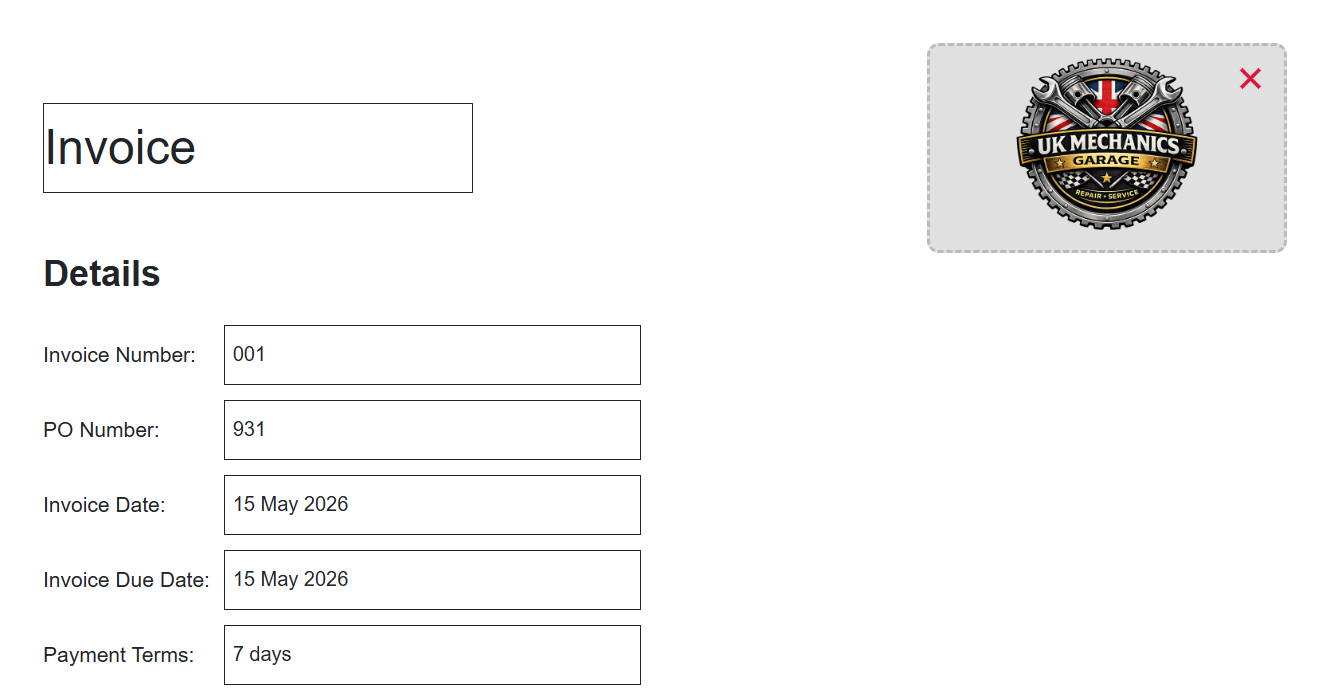
These examples shown are made using invoiceatlas.com to create a free invoice for the UK. When creating an invoice you always want to start with the details section of the invoice, this includes the text stating clearly that it's an invoice (as shown in figure 1) that you can also add a logo to an invoice for extra branding when sending an email to clients. You should also include a unique invoice number such as 001, 002, or another sequential numbering format to help identify each invoice. A purchase order must also be included to help link the buyer to that specific purchase and can also help prove that a purchase was approved, and can act as a legally binding document that can protect both parties.
Invoices should also include an invoice date as well as a due date for the invoice. Then finally you can write the payment terms for the goods/services provided and for what time period payment must be made within e.g. 7 days or 30 days..
From and Bill To section
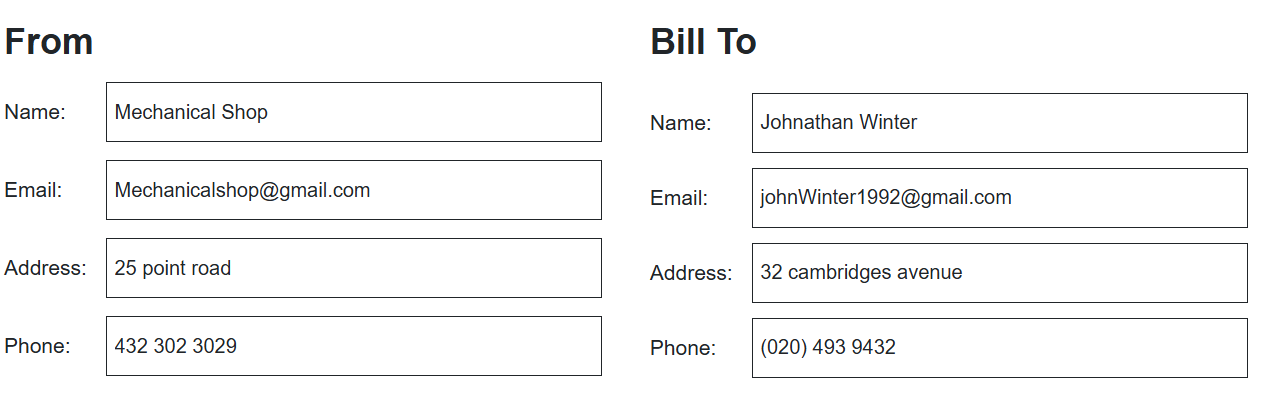
The next section is a requirement for invoices and these are (as shown in figure 2) the “From” and “Bill To” section of an invoice, the “From” section is where you enter information like your company name, email, address and phone number. The “From” section is necessary and helps provide contact information to the client so they have an available method to contact you if they have any queries and also helps identify you as the party legally demanding the money.Then the “Bill To” section includes the client’s name, email, address and phone number. This helps to identify the debtor and binds them to what money is owed, it’s also needed for proving a commercial agreement was made and is used by HMRC to verify who received the goods/services.
Invoice items section
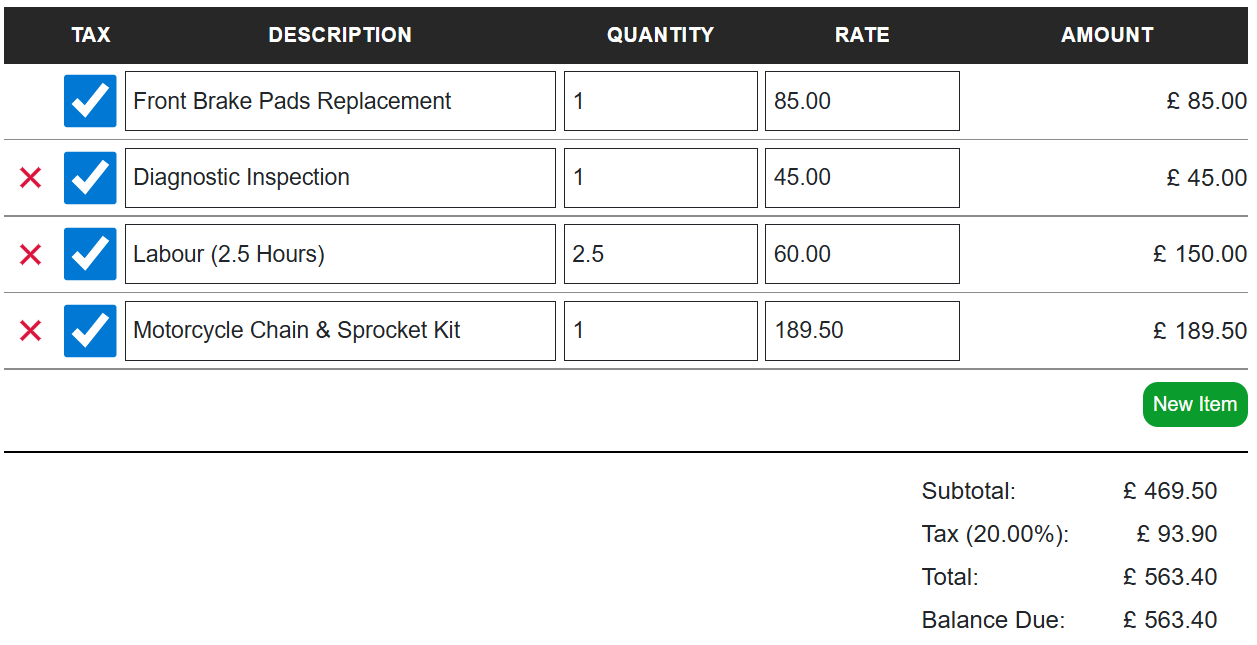
The next part of an invoice is the invoice item section (as shown in figure 3), this is where you add items and then input whether they are taxed, description/item name with the quantity and rate of the item. The invoice item section amounts are automatically calculated when using invoiceatlas.com free online invoice generator for the uk, helping to remove the possibility of accidental miscalculations when creating an invoice. Then the final section is the subtotal of the invoice item’s, then the tax percentage applied (tax percentage be changed on invoiceatlas.com) and then the total and balance due displaying how much money is owed by the buyer for their purchases goods/services.
Notes and terms section
Then the final two sections of invoices are the notes and terms section. This is where in notes you can write any of your extra information you wish the buyer to know upon reading the invoice, and then terms textbox allows for you to add any terms and conditions to your invoice to make the buyer aware of your terms.
Now that each section of a UK invoice has been explained, you can use InvoiceAtlas to create and download your own professional UK invoice PDF online for free.

UK invoice Example
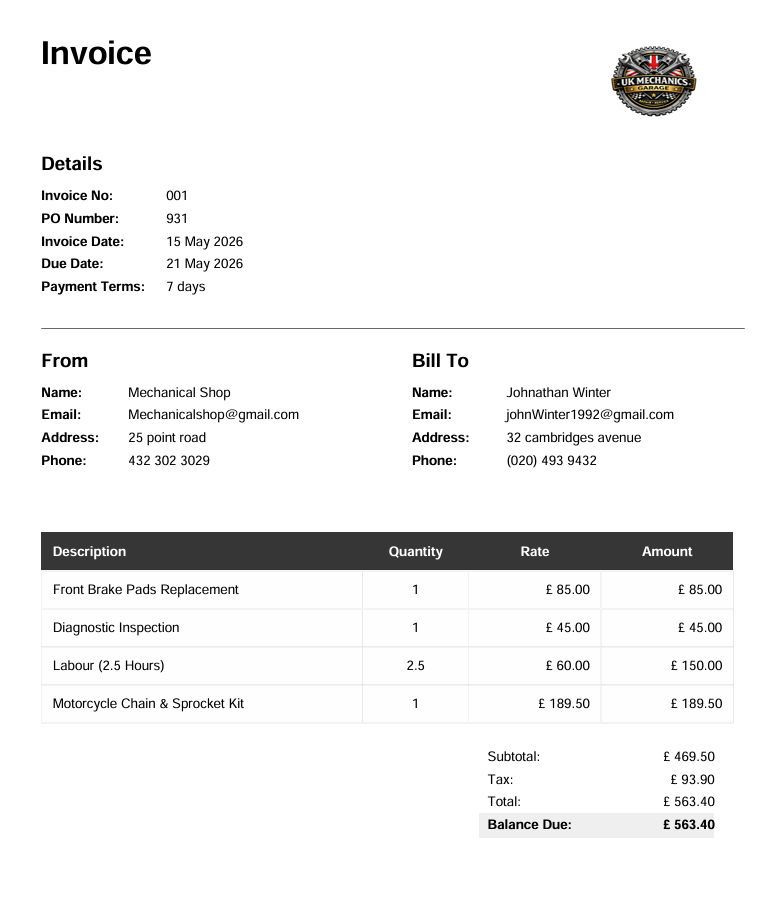
So as you can see (as shown in figure 5) the full invoice structure includes all the foremost details we previously mentioned, text stating it's an invoice, the company logo included on the invoice,a “Details” section for the invoice, both a “From” and “Bill To” section. The invoice items section as shown and then the invoice’s totals section showing balance due. When combined together, these sections create a professional UK invoice that includes all the important information needed for businesses, freelancers, and contractors requesting payment.
Download UK Invoice PDF
The other alternative is a free invoice generator, these are tools that don’t require payment to download an invoice pdf. Free invoice generators vary greatly, with some features requiring a paid tier to use, with some others requiring an account having to be made before being able to download the invoice pdf and some even limiting your amount of invoice pdf downloads monthly. Therefore it is not common to find invoice tools that are completely free, and that don’t require a login and offer all their features totally unrestricted and for free.
There are several ways to create and download UK invoice PDFs, including:
- invoice software
- downloadable invoice templates
- free online invoice generators
Traditional invoice software limits
Traditional invoice software often requires monthly subscriptions and may limit:
- invoice downloads
- template access
- advanced features
- multi-currency support
Create a free UK invoice PDF online
Some platforms also require users to create accounts before downloading invoice PDFs.
Free invoice generators provide a faster and more flexible alternative for freelancers, sole traders, contractors, and businesses that need professional invoices quickly.
InvoiceAtlas was created to provide a free and simple way to generate professional UK invoice PDFs without requiring subscriptions or account signups.
Features include:
- unlimited PDF downloads
- mobile compatibility
- multi-currency support
- editable invoice templates
- no download limits
- no required login
Who is InvoiceAtlas useful for?
This makes InvoiceAtlas useful for:
- freelancers
- sole traders
- contractors
- small businesses
- mobile invoicing on the go
Create your invoice in minutes
You can create and download a professional UK invoice PDF directly from your browser in minutes.
Frequently asked questions
Do UK invoices need VAT?
A UK invoice only requires a VAT included when either your business is VAT registered and selling to another VAT registered business, or if there is a retail transaction that's over £250.00 upon request.
Can I create invoices without software?
Yes absolutely, there is a wide range of free invoice generators out there available that can provide many different useful features and designs. One such free invoice generator tool is invoiceatlas.com.
Is this invoice generator free?
Yes, invoice atlas’s invoice generator is completely free and charges no monthly subscriptions or download costs. It has unlimited downloads and requires no payments to be able to use any features.
Can sole traders create invoices in the UK?
Yes. Sole traders can legally create invoices for goods and services provided to customers. Professional invoices help sole traders track payments, maintain financial records, and provide proof of income for accounting and HMRC purposes.
Can I create invoices on mobile?
Yes. Mobile-friendly invoice generators allow invoices to be created directly from phones and tablets. This is useful for freelancers, contractors, and businesses that need to quickly generate invoices while away from a desktop computer.
What is the best format for invoices?
PDF is one of the most commonly used invoice formats because it preserves the invoice layout across devices, browsers, and email clients. PDF invoices also appear more professional and are easy to download, print, and store digitally.
Can I download invoice PDFs for free?
Yes. Many online invoice generators allow users to create and download invoice PDFs for free. Some platforms may require accounts or paid subscriptions, while others like InvoiceAtlas offer unlimited free invoice PDF downloads without signup requirements.
What should a professional UK invoice include?
A professional UK invoice should include: invoice number, business details, customer details, invoice issue date, payment due date, item descriptions, quantities and pricing, VAT information if applicable, and final balance due. Including these details helps maintain professionalism and reduces payment disputes.
Create your free UK invoice
Use InvoiceAtlas to build and download a professional UK invoice PDF for free.
Try the Free Invoice Generator